Hello SuperCat Users,
This quarter, we’re shipping clarity and control: Custom tabs in your product detail view, smarter activity analytics, and sturdier order tag checks. Here’s what’s new and how to use it.
⬇️ Here's what's new from Q3 2025:
Table of Contents
- 1. Custom tabs in your product detail view – New Feature
- 2. Improvements: Analytics coverage: report & list activity
- 3. Fixes: Order item tag validations
🗂️ 1. Introducing: Custom tabs in your product detail view (New Feature)
Give shoppers and reps clearer context by splitting “related” content into purpose-built tabs such as Alternatives, Collections, Curated Sets, and more.
- You can now define several “Alternative-items-like” fields on
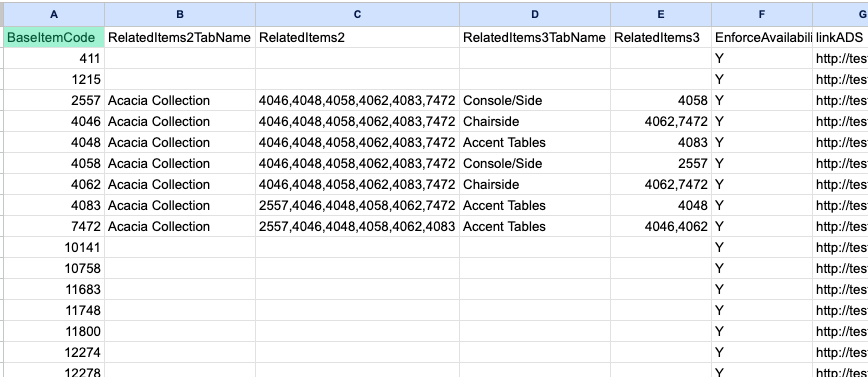
products.csv. Each field creates its own tab on the product details view page, listing the SKUs you specify, just like the existingRelatedItemsbehavior. This lets you distinguish, for example, between data from your AlternativeItems field and your RelatedItems field. - Name tabs your way. Set a human-friendly label per tab (e.g., Collection, Alternatives, Curated Sets).
💡 Why this matters: Previously, you could only surface one custom group tab via RelatedItems. Now you can create multiple curated groupings per item (e.g., A collection from “Alternative-items-like” fields and “Related” from RelatedItems, plus any others you’d like to add).How to set it up (product.csv file headers)
- Keep your existing
RelatedItemscolumn for the first grouping. - For additional groupings, add numbered columns and matching label columns:
RelatedItems2→ SKUs list (comma-separated)RelatedItems2TabName→ the tab label to displayRelatedItems3→ SKUs list (comma-separated)RelatedItems3TabName→ the tab label to display, and so on...
- In summary, each populated
RelatedItemscolumn generates its own tab using the label fromRelatedItemsTabName.
How many tabs can I add?
- Technically extendable, but for optimal usability, we recommend capping at ~4 tabs per product to avoid a crowded UI.
Prerequisite
- This feature requires the new importer to be enabled for your organisation. If you’d like to try it, please contact SuperCat Support, and we’ll enable it for you (self-serve control coming soon).
Admin/data notes
- Add one or more new columns to
products.csv(e.g.,MoreRelatedItems,CollectionSKUs, etc.). - Populate each with comma-separated SKUs.
- After import, each populated column appears as its own tab in eCat and eOL.
- Existing
RelatedItemsconfiguration (visibility, layout) still applies.
Example layout (showing Alternative and Related groupings):
✅ eCat Admin | ✅ eCat Online | ✅ eCat iPad
📈 2. Improvements: Analytics coverage: reports & lists
We’ve expanded activity tracking to power more useful reporting and insights:
- Added activity tracking to support usage reporting and customer-level insights:
- Report Run event
- List Created event
- Metadata captured for which customer the report/list is for (when applicable)
💡 Why this matters: These events lay the groundwork for deeper adoption analytics and customer-level engagement views.
✅ eCat Admin | ◽️eCat Online | ◽️ eCat iPad
3. Fixes: Order item tag validations
We tightened validations to prevent inconsistent tag states at submission and improved error messaging for clearer guidance.
✅ eCat Admin | ◽️ eCat Online | ✅ eCat iPad
🔮 What’s Coming Next?
We’re rolling out improvements in thoughtful waves, guided by your feedback and our product vision. Expect a steady cadence of wins, refinements, and reliability boosts.
💬 We'd Love Your Feedback
We are confident that these updates will improve your experience and streamline your sales process.
As always, please don't hesitate to contact our support team with any questions or feedback.
With gratitude,
The SuperCat Solutions Family.