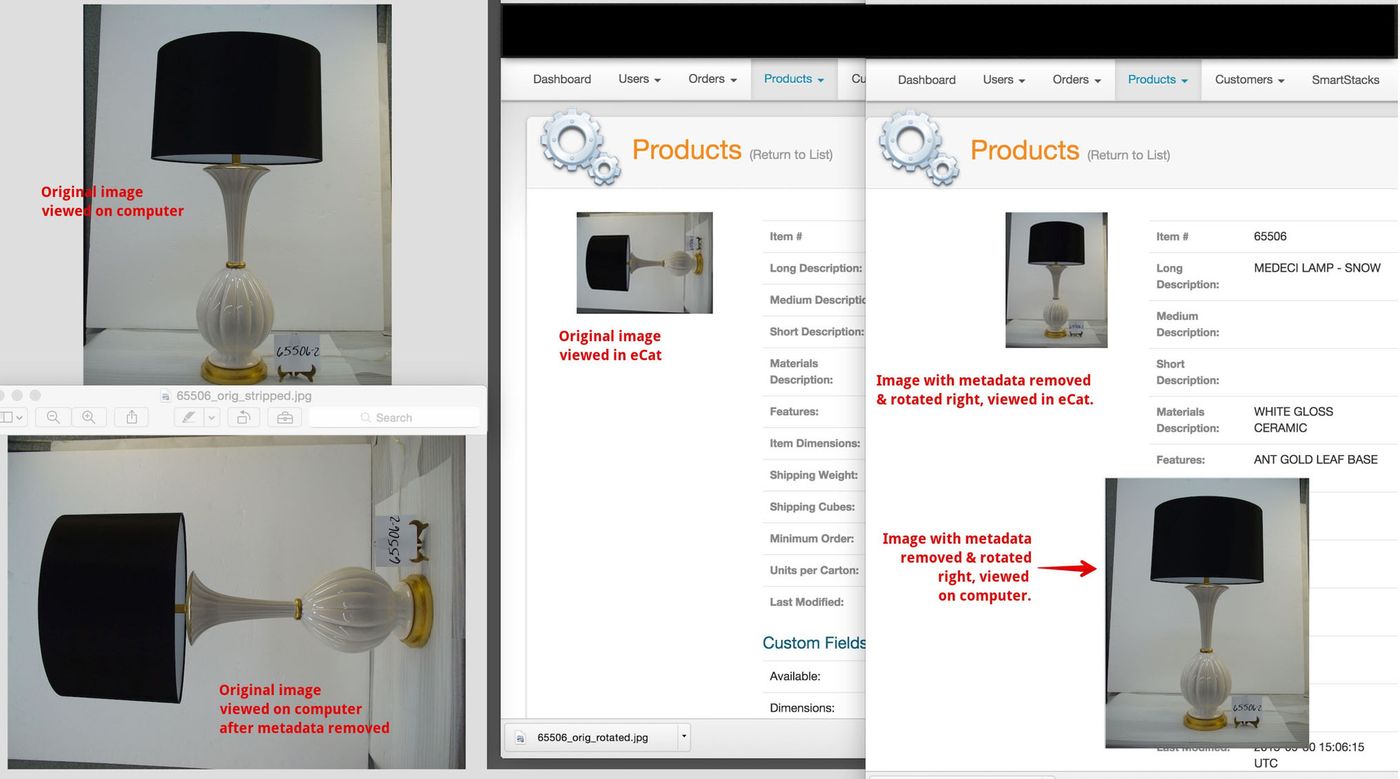
Images occasionally display right side up on computers and in the camera on which they were taken, but are shown sideways in eCat. This can happen when photos are taken in portrait orientation with iPhones, iPads, and other cameras that handle image rotation with software.
This is because the rotation instructions in the image file metadata are not recognized by eCat. So the image displays right side up when viewed using software that recognizes and acts on the rotation instructions, but the image displays 'sideways' when viewed in eCat and may other types of software that display the image without reading the image metadata.
To ensure the image displays right side up however it is viewed, remove the rotation instructions metadata in the image file, then use a tool like Photoshop to rotate the image right side up. The image will then display correctly in eCat and in all other software.
On a Mac computer, an image compression tool like ImageOptim can be used to remove the image metadata. This article explains the problem more fully and suggests using Microsoft’s free Windows Live Photo Gallery on a PC to correct image rotation issues.
Using a different camera might be another option to avoid future problems.