Implementing Shipment Tracking
When appropriate data is provided, shipment tracking numbers display in the portal invoice view with clickable links to the carrier tracking sites. This enables portal users to quickly track shipments or verify delivery with a single click.
There are three ways to implement tracking in the eCat Online portal.
- Specify the tracking number and carrier in the invoice_data.csv order header using the 'TrackingNumber' and 'TrackingCarrier' columns. Use this method if your company only supports a single tracking number per invoice. See Sales Portal File Specifications for details.
- Specify tracking numbers and carrier in the invoice_data.csv invoice line fields 'ItemTrackingNumber' and 'ItemTrackingCarrier'. Use this method to enable tracking delivery of specific items on the invoice. See Sales Portal File Specifications for details.
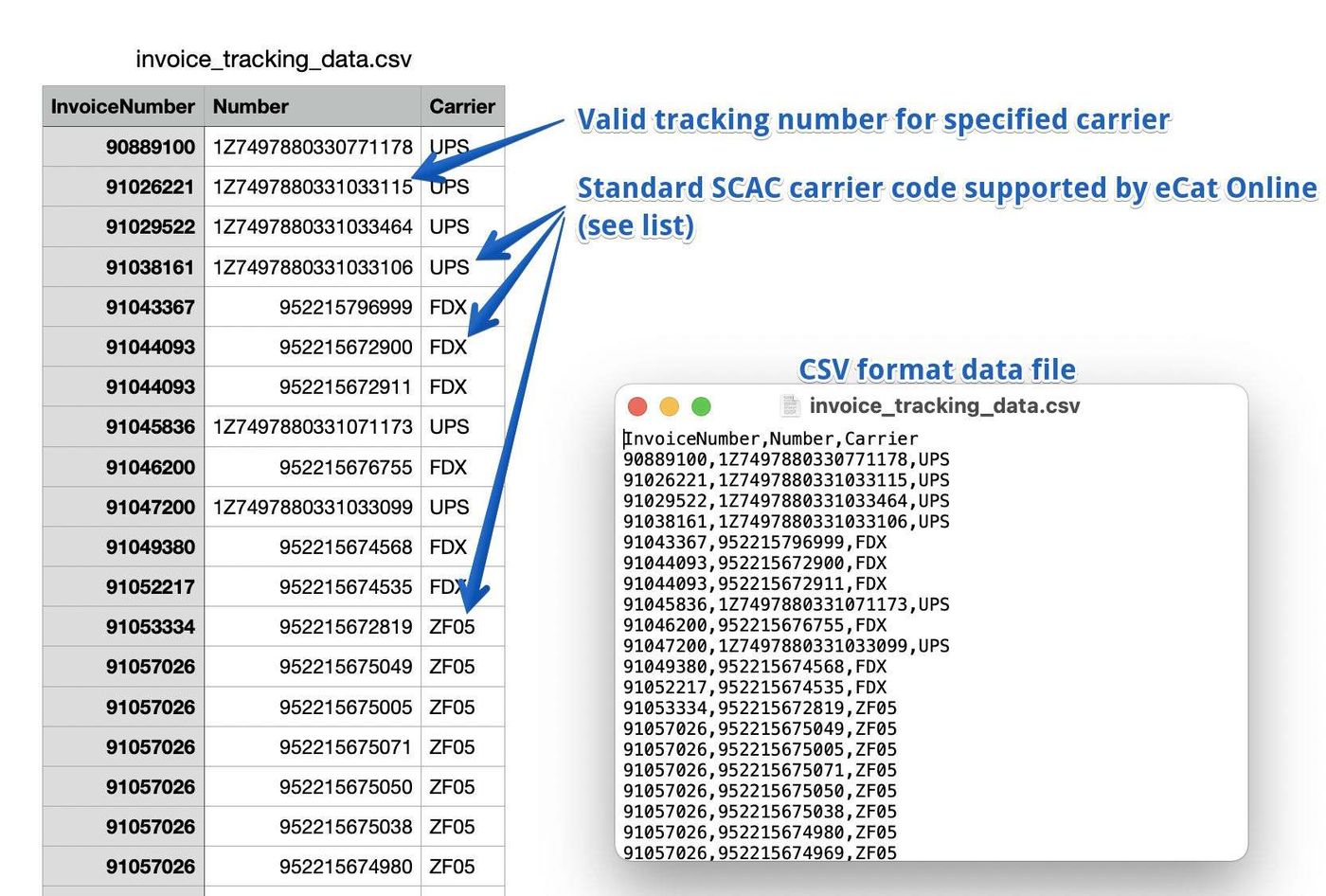
- Specify tracking numbers in the invoice_tracking_data.csv file. Use this method if there are multiple tracking numbers per invoice. See below for details.
Only one of the three methods should be used for any given invoice. For example, if a tracking number is sent in both the order header field and in the tracking data file, the tracking number will display twice in the invoice view and the tracking link may not be generated.
Import File Format: invoice_tracking_data.csv
To import tracking information outside of the invoice file (option 3 above), you will upload a file called invoice_tracking_data.csv. It will contain the following columns:
InvoiceNumber—(required) this must match the invoice number used ininvoice_data.csvand corresponds to the invoice for this tracking numberNumber— (required) this is the tracking number, a string, e.g. "1Z999AA10123456784" for a UPS tracking number.
Carrier—(optional, but recommended) the standard NMFTA SCAC carrier code for this tracking number. See section below for a list of common values. If you omit this we will display the tracking number as text, instead of as a clickable link.
NOTE: If there are multiple tracking numbers for an invoice, there should be one record for each invoice/tracking number combination.
Carrier Codes
Motor freight carrier codes should be valid SCAC codes. Send the value 'UPS' for all UPS tracking numbers, and 'FDX' for Fedex tracking codes regardless of the shipment service level. We currently support the following carrier codes per carrier (case insensitive).
- FedEx - fdx
- UPS - ups
- USPS - usps
- AAA Cooper - aact
- ABF Freight - abfs
- Averitt Express - avrt
- Conway Freight - cnwy
- Mountain Movers - mmtl
- Estes - exla
- Old Dominion - odfl
- R&L Carriers - rlca
- SAIA - saia
- Southeastern Freight Lines - sefl
- YRC - yfsy
If you ship via carriers not listed here, please email a list of carrier names with their SCAC codes that you need added along with test tracking numbers for each to support@supercatsolutions.com.