Overview
As an optional feature, SuperCat can automatically email notifications to sales reps every time a customer signs into or places an order in eCat Online.
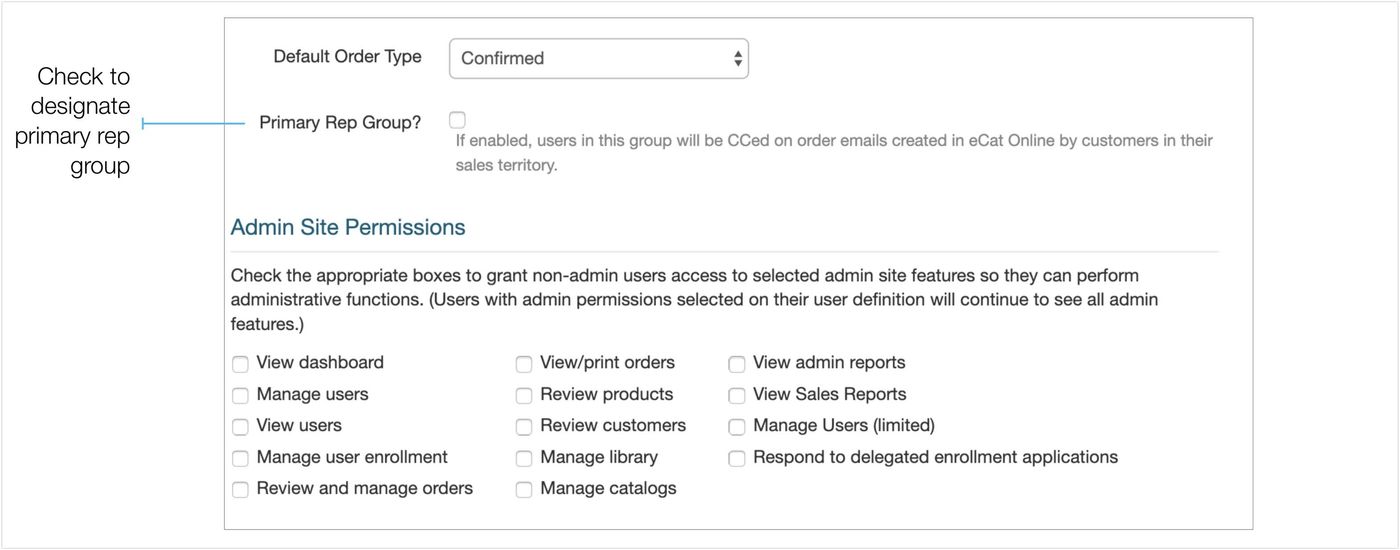
You may need to enable some users to view customers without them receiving the eCat Online email notifications sent to the primary sales reps, or "reps of record". For instance, you may have people writing orders in a showroom on behalf of the sales rep. These users don't need to be notified of new eCat Online logins, nor do they need to be CC-ed on eCat Online order emails. You can use the 'Primary Rep' User Group setting to accomplish this.
Implementation
Here's how to set it up.
- Create a new User Group for sales assistants, sub-reps and others who should see customers, but not receive email notifications.
- Assign sales assistants and others who should not receive notifications to the new User Group
- Verify that only primary reps who should receive notifications are assigned to the sales rep group(s). We call these primary reps "reps of record".
- In the User Group definition(s) designate the User Group(s) containing reps of record as "primary rep group"(s) . Only users in those group(s) will receive the eCat Online email notifications.
How it Works
When the feature is enabled,
- eCat Online (website) customer login notifications are emailed to all users with a territory code that matches the territory code assigned to the eCat Online user's customer account.
- eCat (iPad) order confirmations are emailed to the first user found in a 'primary rep' user group with a territory code that matches the territory code assigned to the eCat Online user's customer account. (Notifications are not emailed to all users with a matching territory code.)