You made it through the Market whirlwind, the handshakes, the hustle, and the late-night order writing. But the work doesn't stop when the showrooms come down. Now's the time to turn momentum into results.
This final installment in our Market series is your go-to guide for what to do after Market. Whether you met fresh faces or reignited relationships, SuperCat gives you the tools to follow up fast, take smart actions, and keep orders rolling in.
Each Power Move below builds on the previous one — from immediate follow-up to deeper organization and strategy — helping you turn Post-Market activity into lasting performance.
📦 Power Move 1: Replenishment Orders; Quick, Clear, Confident
Market excitement leads to fast-moving SKUs. Don't wait for bestsellers to vanish before reacting. With SuperCat's Sales Portal, you can:
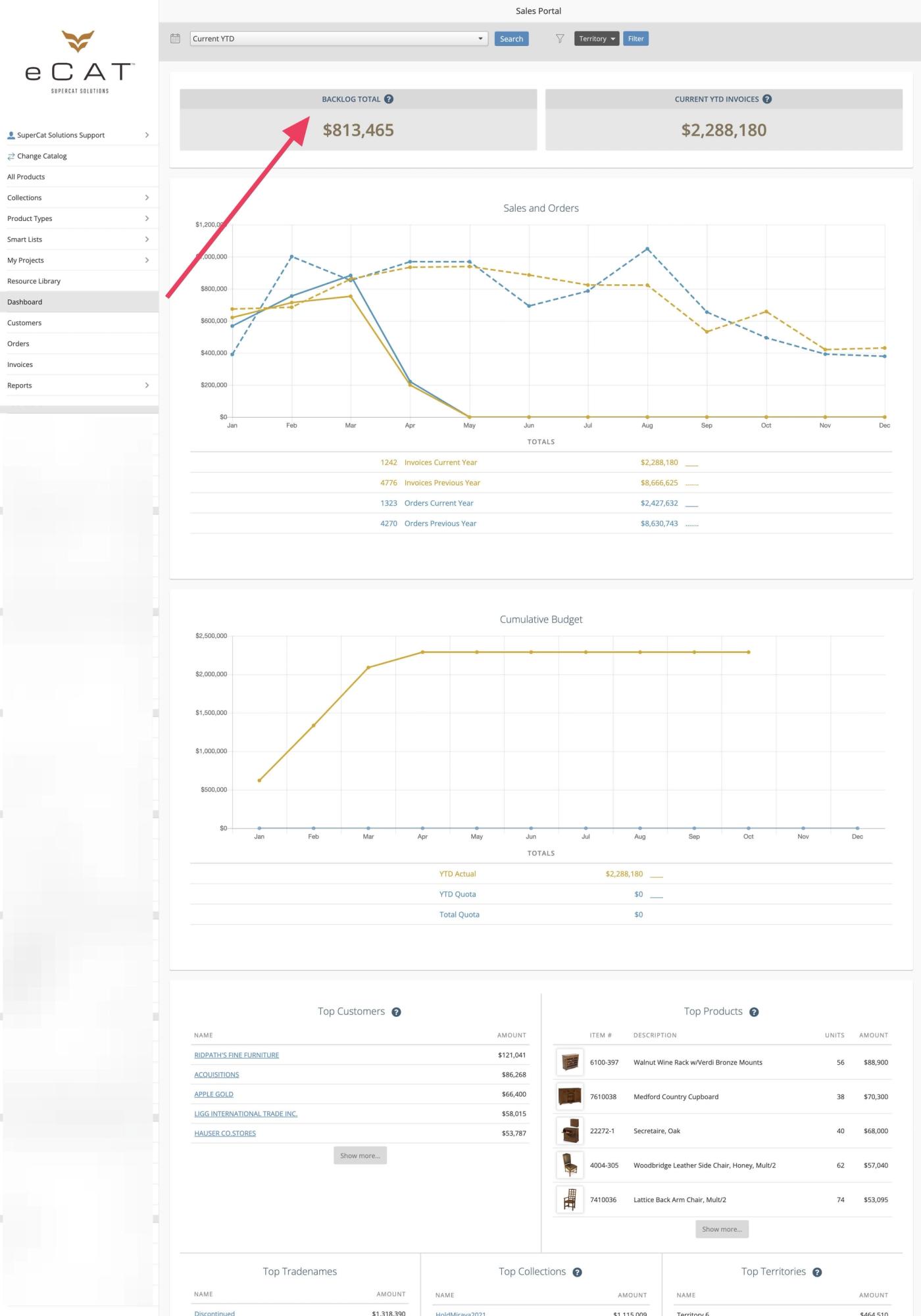
1. Access the Sales Portal Dashboard
Get instant visibility into your sales performance with real-time widgets and key metrics that give you the insights you need to make smart decisions fast.
- Sign in to eCat Online > “Dashboard”:Look for the “Backlog Total” widget for immediate insights.
2. Monitor Invoice Status and Payment Tracking
Track and reconcile Post-Market orders quickly with a central, searchable invoice list.
- eCat Online > “Invoices” in the left-hand side menu:View invoice totals and payment status at a glance.Search by order, invoice, PO, item, or customer number.Filter by date range to track Post-Market activity.Click individual invoices to view detailed line items and tracking information.Export invoice data for accounting or follow-up.
3. Analyze Product Performance
Turn data into action; identify bestsellers, trends, and restocking priorities that keep your inventory optimized.
- eCat Online > “Reports” > “Product Details”:Sort by “Units” sold or “Amount” to view high volume orders or best sellers.Filter by Last 30 Days or Market Week.Click “Customize” in the top right-hand corner to create detailed views.Export to CSV for deeper purchasing analysis.
Power Filter: Order Origin
If you use order origin codes (e.g., Market 2024, Pre-Market, Post-Market):
- Use the “Order Origin” filter to analyze what sold during specific periods.
- Compare performance across different selling seasons.
- Focus on replenishment patterns and seasonal trends.
What to Look For:
- Items that generated buzz and got written on multiple orders across customers.
- SKUs with high velocity and strong market performance.
- Products trending upward in Post-Market orders.
💡Pro Tip: Filter by Last 30 Days or Market Week to pinpoint demand. Export key reports for your purchasing team and bookmark filter combinations for easy reuse.💡Customer retention tip: Fast replenishment keeps customers confident in your reliability, which turns first-time buyers into loyal partners.
🆕 Power Move 2: Re-Engage Market Leads
Every show brings new leads — some write orders right away, others need a little follow-up. Use your Sales Portal dashboard to re-engage market leads and dormant accounts.
1. Access Customer Analytics
- eCat Online > “Dashboard” > “Top Customers” section.
- Click on any customer from the “Top Customers” widget to access their comprehensive profile:View the “Backlog Total” to see outstanding orders and revenue in the pipeline.Check the “Last Order Date” to gauge recent engagement and identify customers who may need follow-up.Review the “Current Year vs. Last Year” sales comparisons to spot growth trends or concerns.Analyze the “Monthly Sales Graph” to understand seasonal patterns and timing opportunities.Browse the “Recent Invoices” to identify high-value transactions and understand purchase behavior.Explore the “Prior Purchases” tab to see detailed product-level buying patterns.
Use these insights to prioritize follow-up, identify replenishment opportunities, and strengthen relationships with key accounts.
2. Identify Market Leads
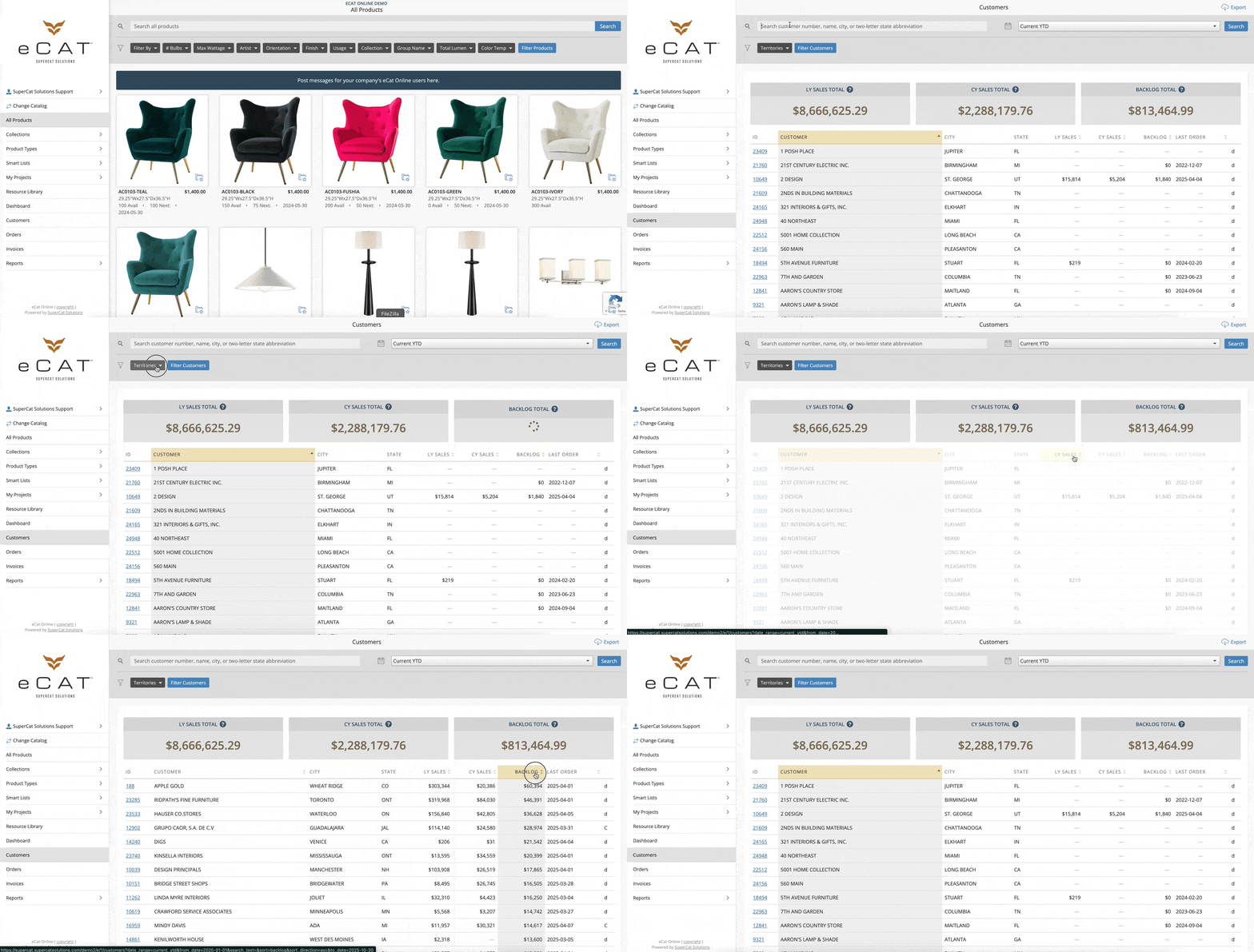
- eCat Online > “Customers”
- Use filters and sorting to find:No orders this year.Active accounts with zero sales.Market conversations that haven’t converted to a first order.
3. Create Targeted Follow-up
- Use eCat or eCat Online to send personalized proposals.
- Build curated Projects or Lists with pricing, markup, and customer-facing design presentations.
- Email presentations directly from eCat for professional follow-through
💡Pro Tip: Save Projects/Lists named after the customer or market event to track what you showed and ensure no lead slips through.
📊 Power Move 3: Analyze Performance and Feedback
It's not just about who you met — it's also about what worked. Use SuperCat’s built-in analytics to make smarter, data-driven decisions.
1. Access Performance Analytics
- eCat Online > “Dashboard” > “Sales and Orders” graph:Filter by date range (e.g., Current YTD, Previous YTD, Previous Year).Review the “Cumulative Budget” Chart (if enabled for your organisation).
Note: To enable the Sales Quota feature for your organization, contact SuperCat Support.
2. Run Territory Analysis
- eCat Online > “Reports” > “Summary”Compare Year-Over-Year sales by territory.Identify reps or regions that need follow-up.Spot engagement gaps (accounts that purchased last year but not this year).
3. Analyze Product Performance
- eCat Online > “Reports” > “Product Details”View Units per customer view to find widely adopted items.Identify collections or SKUs that gained (or lost) traction.Check pricing levels vs. order volume to flag discount misalignments.
4. Customer List Hygiene
- eCat Online > “Customers”Filter customers by “Last Order Date”.Cross-reference with “Backlog” data to detect “ghosting” customers.Distinguish between accounts waiting on fulfillment and those that have gone silent.
💡Pro Tip: Use the "Last Order Date" and "Backlog" columns together to detect “ghosting” customers and those who may be stuck waiting on fulfillment. This is your moment to sharpen internal strategy and identify opportunities to coach, correct, or double down.
🛋️ Power Move 4: Refresh Your Catalogs and Offers
Market feedback is gold. Which products sparked the most interest? Which fell flat? Post-Market is the perfect time to refresh what your customers see online.
1. Analyze Market Response
- Review Product Details Report for items with high inquiry rates.
- Check Top Collections and Top Products on the Dashboard.
- Compare products that drew attention vs. actual orders.
2. Update Digital Presence
- Update eCat and eCat Online collections or featured products.
- Add key SKUs to Smart Lists like Best Sellers, Ready to Ship, or Market Favorites
- Add New Introductions or Limited Stock items to Smart Lists to highlight them for targeted marketing pushes.
3. Create Targeted Offers
- Launch limited-time offers for market favorites
- Set promotional pricing for slow movers that caught attention
- Build bundles or kits based on Post-Market insights
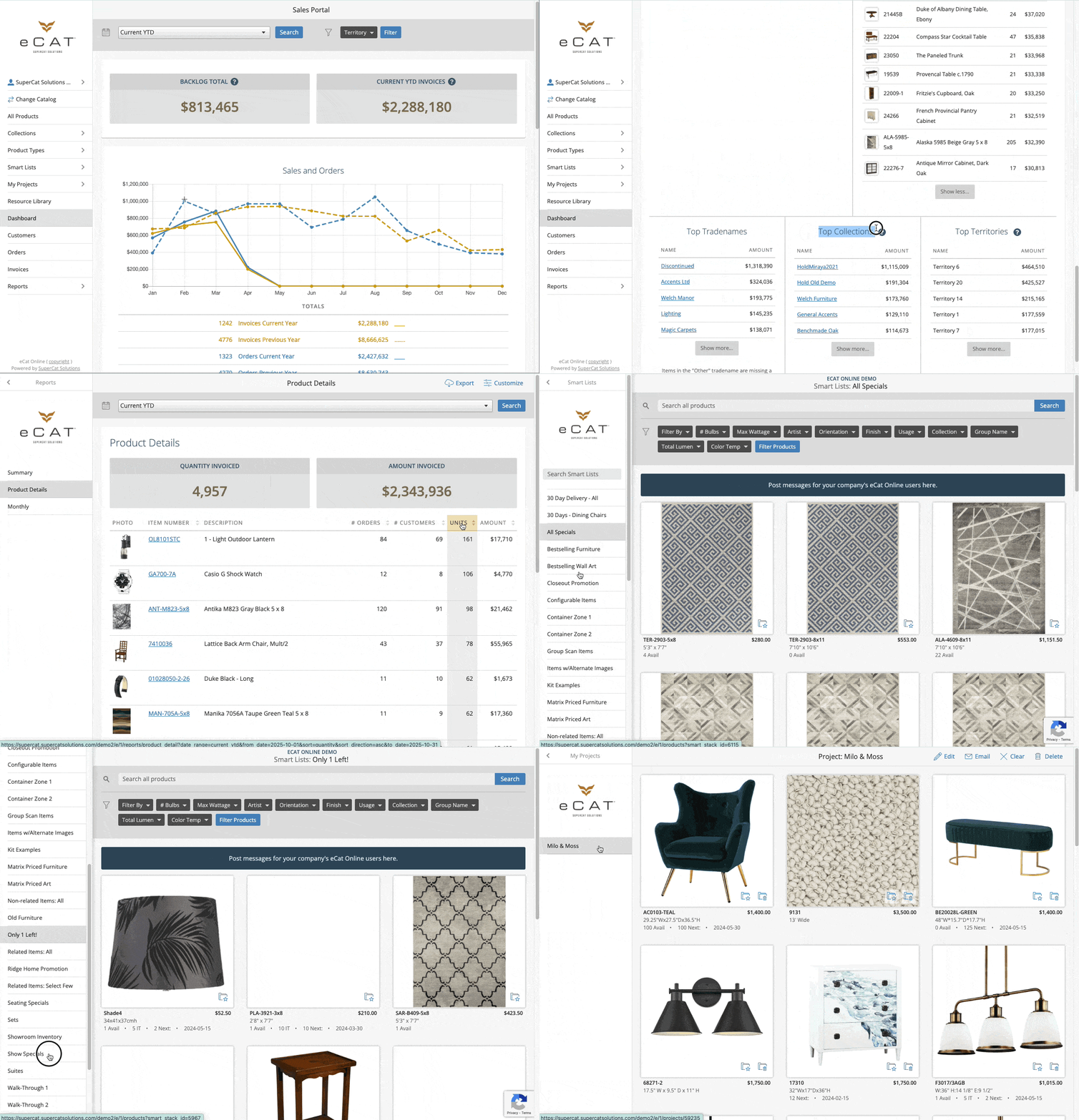
💡Pro Tip: Use the Product Report to view Units per customer to spot products gaining wide adoption; perfect for front-of-catalog placement. Keep your digital presence aligned with what customers are actually looking for right now.
🗺️ Power Move 5: Master Territory Management & Organization
Post-Market success isn’t just about individual wins, it’s about strategic territory management and team efficiency. Companies that organize territories effectively see higher growth and stronger customer retention. This Power Move ensures every opportunity is covered and every rep stays focused.
Business Impact:
- Sales Managers: Gain visibility into territory performance gaps and optimize rep coverage.
- Sales Reps: Focus on high-value accounts, avoid overlap, and strengthen relationships.
- Leadership: Make informed decisions about expansion and resource allocation.
1. Access Territory Analytics
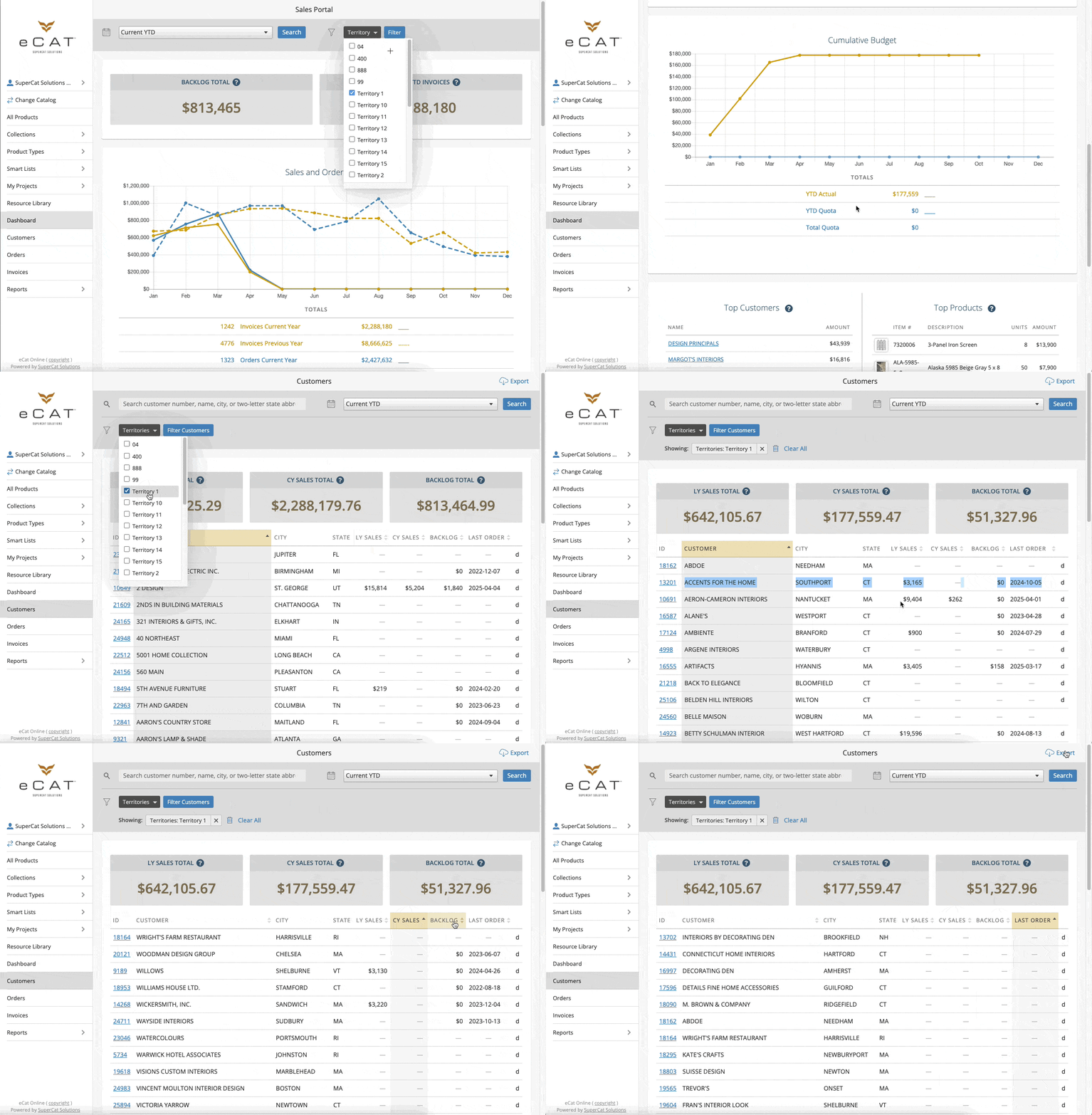
- eCat Online > “Dashboard” > “Top Territories”:
- Review territory performance and identify growth opportunities.
- Apply territory-based filters for deeper, focused insights.
2. Track Customer Relationships
- eCat Online > “Customers”
- Use the territory filter to segment customer data.
- Track engagement, order frequency, and dormant accounts.
Example: A rep noticing a drop in repeat orders can reassign follow-up before the account goes cold.
3. Review organization-level Insights
- Review sales facts and understand how your portal data type affects reporting.
- Confirm your sales portal currency code for accurate financial data.
💡Common Use Case: After Market, Sales Managers often need to see which territories are driving the most follow-up orders and where engagement has dropped off.By filtering your Top Territories dashboard and cross-referencing with Customer activity, you can quickly spot high-performing regions and assign extra support to those lagging behind.
💡Pro Tip: Configure organization settings carefully to ensure visibility and accuracy across territories. This prevents rep conflicts, strengthens communication, and provides your team with the clarity needed to serve customers efficiently.
🚨 Bonus Move: Close the Loop with Delivery Visibility
The Market may be over — leads converted, orders placed, and energy high. Don’t let that velocity fade once the showrooms are packed up. With SuperCat’s shipment tracking and delivery visibility, you can close the loop seamlessly, keeping customers informed, confident, and ready to buy again.
Customer satisfaction drops fast when shipment visibility is poor. SuperCat’s tracking tools turn fulfillment from reactive to proactive — building trust, preventing delays, and driving repeat business.
Business Impact:
- Customer Service: Reduce “where’s my order” calls with proactive updates.
- Sales Teams: Strengthen relationships through transparent communication.
- Operations: Identify bottlenecks and optimize carrier performance.
- Customer Retention: Turn delivery experiences into competitive advantages that keep customers coming back.
1. Enable Shipment Tracking Integration (see Pro Tip below)
- eCat Online > “Invoices"
- Open any invoice to view shipment details and carrier tracking links.
- SuperCat automatically generates tracking URLs for major carriers (FedEx, UPS, USPS, Estes, Old Dominion, Saia, etc.).
2. Proactively Manage Shipments and Backlogs
- Use Invoices and Dashboard widgets to stay ahead of delayed or aging orders.
- Track shipment progress and provide customers with clear, accurate ETAs.
3. Improve Customer Communication
- Include tracking information in customer updates.
- Allow customers to access real-time carrier links for shipment status and delivery details.
- Reduce inquiry volume through transparent tracking.
Example: After Market, a lighting brand, reduced service inquiries by 42% after automating delivery notifications through SuperCat’s Sales Portal.
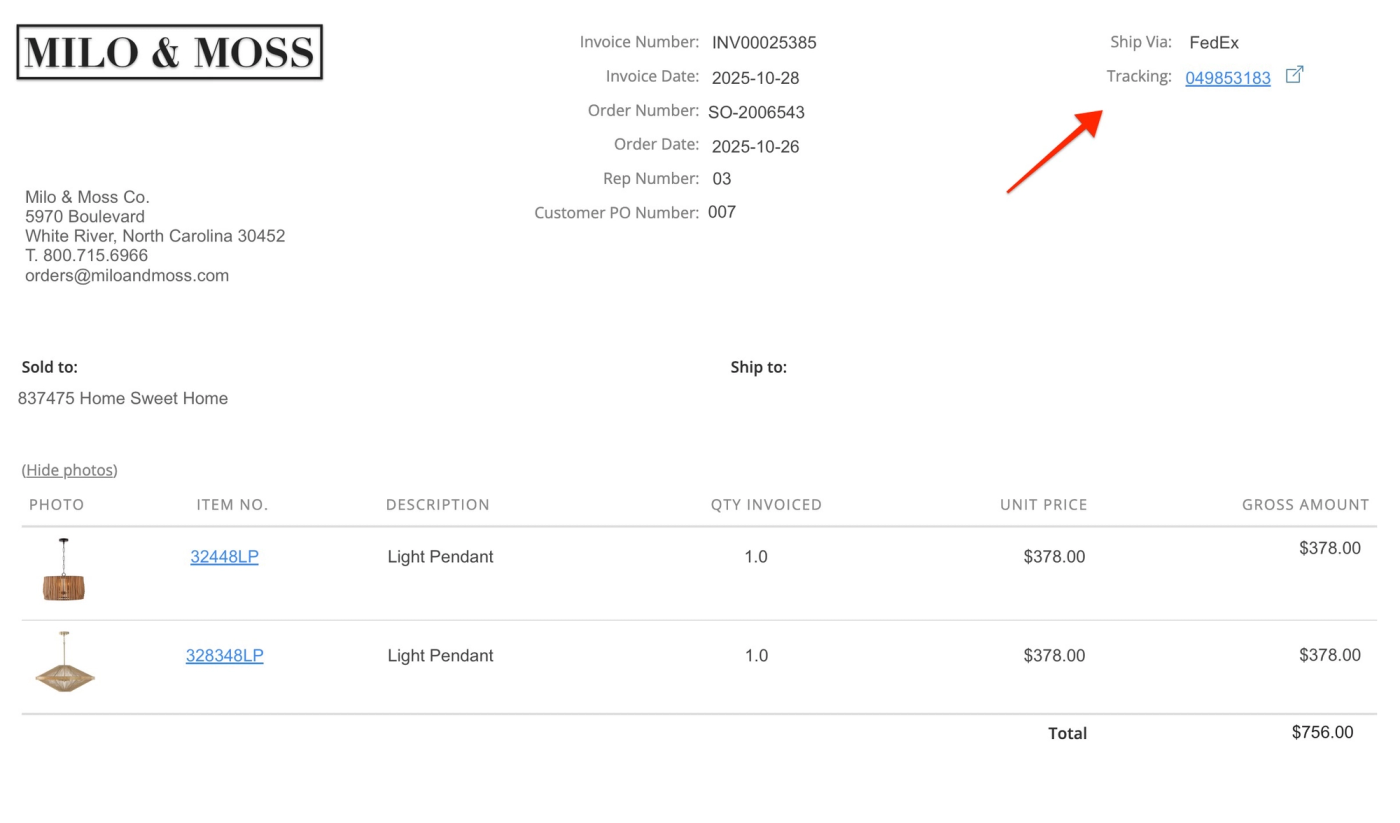
💡Pro Tip: SuperCat supports 20+ carrier integrations and automatically generates accurate tracking links, helping your team deliver reliable, professional updates. Learn how to set up Shipment Tracking.
You’ve built momentum, now keep it working for you. With SuperCat Solutions, you can close the loop on your Market success: from capturing leads and writing orders to delivering seamlessly and re-engaging customers with confidence.
Each SuperCat Power Move helps you strengthen relationships, streamline operations, and stay ahead of every order long after Market wraps.
Focus on What Matters Most
- Relationships: Follow up fast and personalize outreach.
- Catalogs: Keep products current and driven by data.
- Operations: Automate where possible to save time.
- Performance: Track order velocity, territory growth, and backlog resolution.
The brands that win Post-Market are the ones who move fastest and smartest — and SuperCat is here to help you do just that. With powerful organization features, comprehensive tracking capabilities, and intelligent analytics, you have everything you need to turn Post-Market momentum into lasting success.
Best regards,
The SuperCat Family