JSON Data
Our JSON order export uses the JavaScript Object Notation format, summarized here. There are a few important issues to note:
- JSON uses floating point for all fractional values (e.g. 5.4). This may occasionally lead to odd values, e.g. "381.59999999999997" due to the fact that floating point numbers cannot represent all numbers. If the value is a price value, rounding it to the correct precision will yield the expected value.
- JSON technically uses floating point for all numeric types (anything labeled "Number") below. We export integer values without the decimal place for consistency and readability, but we do recommend you use an existing JSON parsing library (such as
DataContractJsonSerializerin .NET)
Orders exported in our standard JSON format will contain the following fields, not necessarily in this order.
Order Fields
- JSON field name JSON typeCan be nullComments
- additional_fields Dictionary/ObjectNo(described below)
- bill_to_city StringYes
- bill_to_company_name StringYes
- bill_to_country StringYes
- bill_to_line1 StringYes
- bill_to_line2 StringYes
- bill_to_postal_code StringYes
- bill_to_state StringYes
- bill_to_address_changed Boolean
YesIndicates whether the bill_to information has changed. - buyer_first_name StringYes
- buyer_last_name StringYes
- cancel_date String, formatted YYYY-MM-DDYes
- customer_email_address StringYes
- customer_number String
YesIf local_customer_code is populated, this will contain the customer code entered by the rep in eCat. In this case, it may be blank. If local_customer_code is not populated, this value corresponds to the bill-to code provided in the customers.csv file. - customer_phone_number StringYes
- customer_po_number StringYes
- discount_amount_cents NumberYes
- discount_percent NumberYes
- ecat_version StringYesThe version of eCat that submitted this order.
- id NumberNoThe internal identifier for this order.
- is_exported BooleanYesInternal use only
- is_submitted BooleanYesInternal use only
- local_customer_code String, UUID
YesIf this is populated, it means the order was written for a customer that was created on the iPad. This is only available in the V2 format of our JSON order export. If it is populated, the "customer_number" field will contain the customer number entered in eCat by the rep. - notes StringYesOrder notes, as entered by the rep.
- order_items ArrayNo(described below)
- order_number StringNoThe official order number. This can change across resubmissions. If you need to track orders across resubmissions, see the uuid field below.
- order_type StringNoE.g. Confirmed, HFC, as specified by the rep, or the default value for eCat Online orders
- organization_id NumberYesThe numeric identifier for your organization.
- price_level StringYesThe price level code for this order.
- rep_email StringYes
- rep_first_name StringYes
- rep_last_name StringYes
- rep_number StringYes
- rep_phone StringYes
- ship_date String (formatted YYYY-MM-DD)Yes
- ship_to_code StringYes
- ship_to_city StringYes
- ship_to_company_name StringYes
- ship_to_country StringYes
- ship_to_line1 StringYes
- ship_to_line2 StringYes
- ship_to_postal_code StringYes
- ship_to_state StringYes
- ship_to_address_changed Boolean
YesIndicates whether ship_to information has changed. - submit_date String (ISO 8601 timestamp, UTC time)NoThe timestamp that the order was submitted. Note that this maybe earlier than when the order showed up on the server. It records when the submit button was pressed.
- surcharges ArrayYes(described below)
- tag_for StringYesThe value of the "tag for" field, set by the rep
- total_cents NumberYesThe total price of the order in cents. Why cents? This avoids floating point errors, because JSON does not have a decimal type, only a floating point type. You can divide by 100 to get the correct value.
- total_product_volume NumberYesThe sum of extended_product_volume for all order items.
- uuid String (UUID)
NoA string globally unique to this order. This string will remain consistent between different resubmissions of the same order, so you can use it to track whether an order is a resubmission or not.
Additional Fields
- JSON Field Name JSON Type
- order_origin String
- shipment_preference String
- <order header custom 1 key> String
Above, <order header custom 1 key> will be the key configured in your order header custom field. E.g. if the key you specified in your custom field configuration is "ship_via" then the additional_fields could look something like this:
Order Item Fields
The order JSON object will contain an array called order_items. That array will contain the following values.
- JSON field name JSON type Can be null
Comments - discount_notes String NoA convenience value containing notes about the discounts that were applied. This is intended for human consumption.
- has_discount Boolean NoTrue if there is a discount or price override applied to this line item. This does not apply to contract prices.
- option_notes String NoA convenience value containing notes about the options that were selected. This is for human consumption. See "option entry" below for the data intended for computer consumption.
- line_notes String NoNotes entered by the rep for the line item.
- extended_price Number YesA calculated value: final product unit price (after discount, override, option add-ons, etc) * quantity
- extended_product_volume Number YesA calculated value: product volume * quantity
- description String YesA description of the product at the time of ordering.
- item_number String YesThe base item code of the product for this line item.
- matrix_option_item_code String YesDeprecated. Please use constructed_item_number instead.
- constructed_item_number StringYesThe item number that was constructed based on various factors, such as option selection.
- options Array (described below) YesThe options that were selected for this line item.
- quantity Number YesA number of items ordered.
- units_per_carton Number YesA convenience value containing the pack quantity for this product at the time of ordering.
Options entry
The options entry mentioned above, if present, will contain an array of JSON objects with the following fields:
- JSON Field Name JSON Type Can be nullComments
- option_name String NoThe name of the option that was selected.
- option_code String NoThe code of the option that was selected.
- option_type_code String NoE.g. OptionSet1, from the product file.
Surcharges
See Order Surcharges for an overview of order surcharges.
The surcharges entry mentioned above, if present, will contain an array of JSON objects with the following fields:
- JSON Field Name JSON Type Can be null
Comments - label String No
A label describing the surcharge - amount Number YesFor "amount" type surcharges, contains the amount of the surcharge, possibly overridden by the rep.
- percent Number YesFor percent type surcharges, contains the percentage to add onto the order as a surcharge
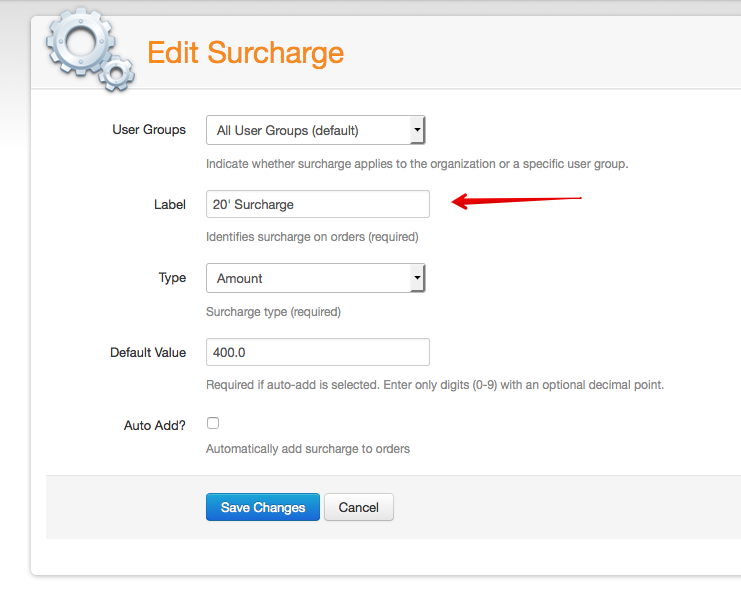
Above, if the surcharge is configured as a percentage, the percent of value will be populated. Otherwise, the amount value will be populated. The label field corresponds to the value specified when configuring the surcharge, as seen in the screenshot below.
Both amount and percent could be negative, in the case of using a surcharge as a discount of sorts.