Overview
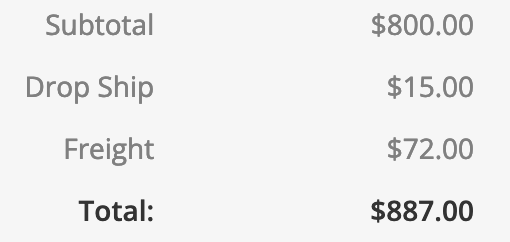
You can use eCat Online Surcharges to easily populate orders with standard fees like handling charges, sales tax, and drop ship charges. On the orders surcharges page, you can define various surcharges, and where they are applied. Many organizations choose to have surcharges automatically added to orders. The surcharge label and amount will display on the order below all the line items, and will be applied to the entire order.
Working with surcharges
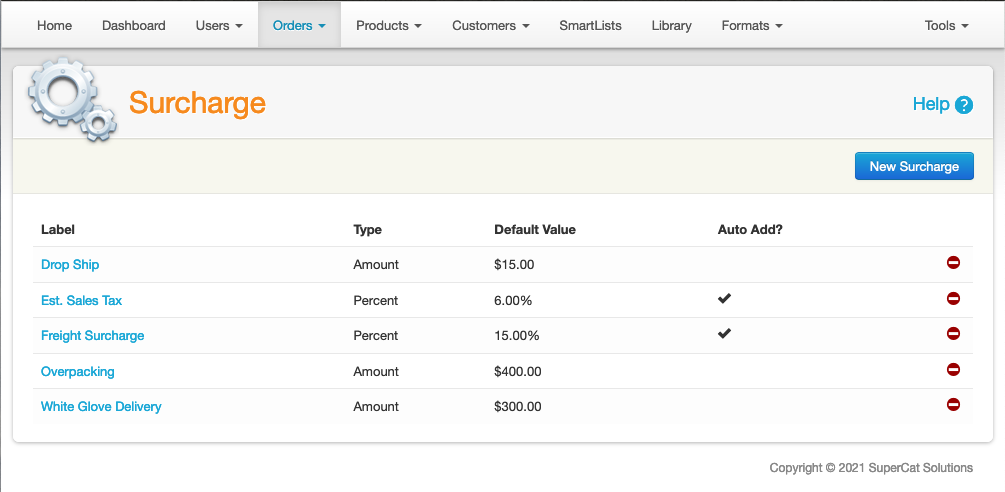
Use the eCat admin portal 'Orders/Surcharges' page to set up and maintain surcharges. Your surcharge can be defined either by a specific amount or by a percentage markup. For example, you can add a surcharge of 5% for shipping and another surcharge of $10 for handling.
Surcharges can be auto-added to orders. Auto-adding surcharges is now support for both eCat and eCat Online. An eCat user can override a surcharge that has been automatically added, but an eCat Online user cannot override or modify a surcharge.
Auto-adding surcharges for eCat Online is turned off by default. If you would like to use surcharges in eCat Online, please contact support. Note that a surcharge that is automatically added for eCat Online cannot be overridden by the user.
Tips and Tricks
Different surcharges can be set up for different user groups. This allows you to set up one auto-added surcharge of 5% for one eCat Online user group and another auto-added surcharge of 7% for a different eCat Online user group.
Surcharges are applied to an order after any discounts are applied.
Note that for eCat Online, a surcharge is only relevant if it is auto-added to the order.