(May 24, 2016)
Summary
To help prevent order pricing errors we’re slightly changing the way eCat price levels work. The change also lays groundwork for adding new functionality to eCat, including the ability to save and work on multiple orders and quotes per customer.
Current behavior (eCat version 2016.2.1 & previous)
- The price level selected in Settings applies to both the catalog and the order.
- The order price level changes when a new price level is selected in Settings
New behavior (eCat version 2016.3 and later)
- Every order is associated with its own price level. Changing the catalog price level no longer changes the order price level.
Details
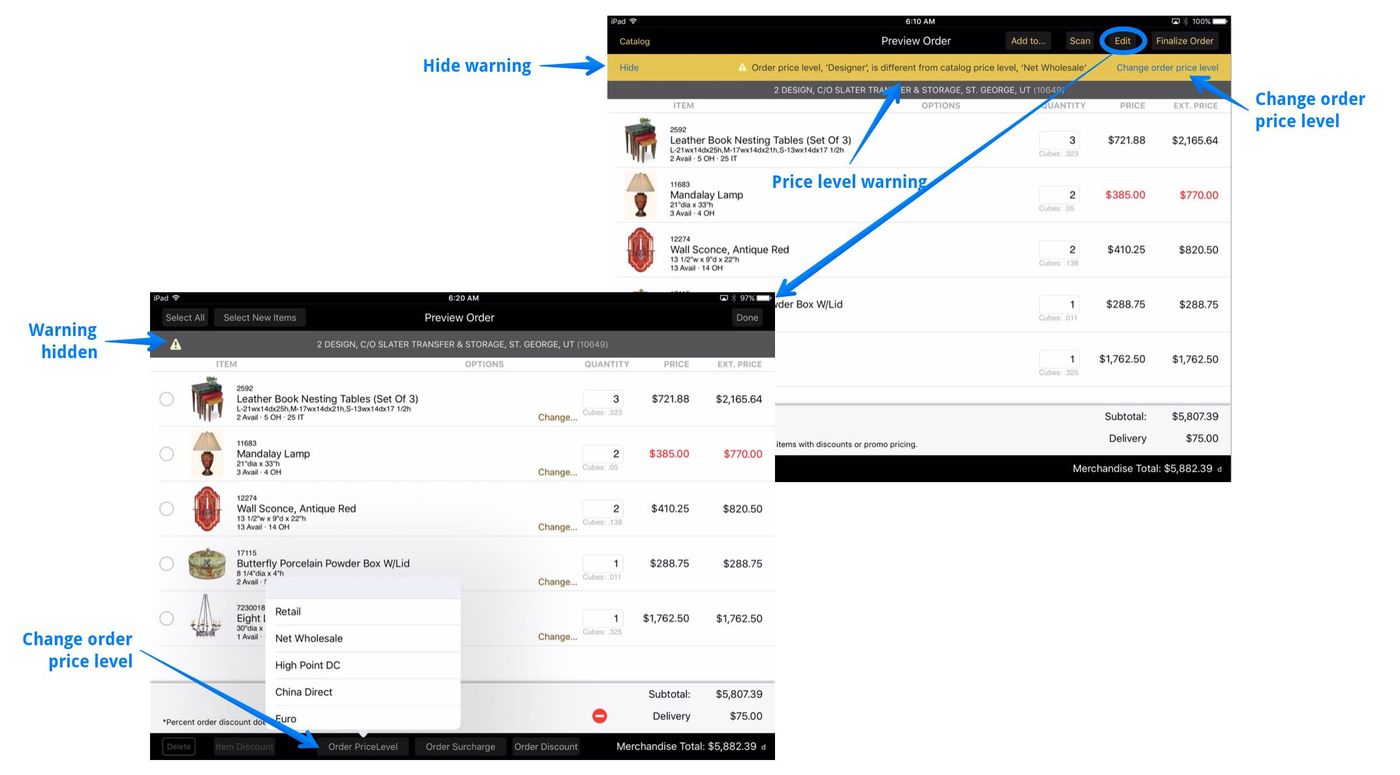
Items are added to an order at the order's price level. If the order’s price level and the catalog price level are different, the prices on the order will not match the prices shown in the catalog. In this case a warning will display in Order Preview. You can hide this warning, and the app will remember your preference next time.
The order price level can be changed at any time. Just tap View Order/Edit/Order Price Level, then select the desired new price level.
If discounts have been applied to an order, these will remain in effect after the price level is changed.
- Percentage discounts are re-calculated based on the new price level.
- Fixed amount discount amounts remain unchanged.
- Price overrides remain unchanged
- Order line price level overrides remain unchanged